Turn Anything Into Step-By-Step Instructions — Hands-Free

Paste a link or upload a photo. Buster uses AI to extract clean steps from articles, printed instructions, sketches, screenshots, and videos — then guides you hands-free with voice.
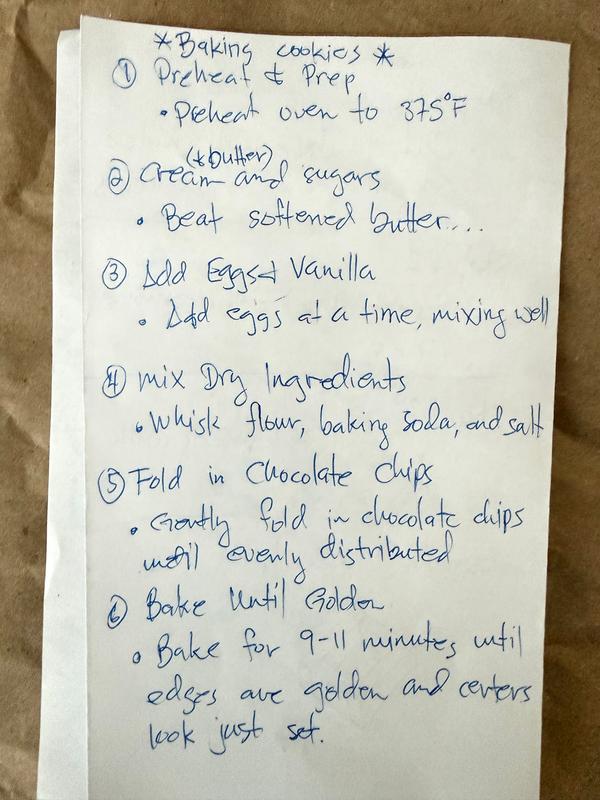
Hand-written cookie recipe on paper Extracted step: Mix Dry Ingredients

Handwritten recipe → Structured guide steps

See Buster in Action

Watch how Buster transforms messy sources into clean, usable steps.

Step 1: Preheat & Prep Step 4: Mix Dry Ingredients Step 8: Cool & Enjoy

From source → steps → edit → hands-free guidance

How It Works

1

Add a Source

Paste a URL, upload a photo, or import a YouTube video.

2

Buster Extracts the Steps

AI analyzes the content and creates structured, numbered steps.

3

Follow & Customize

Edit, reorder, add tips, save your guide, or say "Buster, next step" to follow hands-free.

What Buster Works With

Real-world inputs, not templates.

Articles & Blogs

Recipe blogs, how-to posts, tutorials

YouTube Videos

Chapters and metadata become steps

Printed Instructions

Manuals, recipe cards, packaging

Screenshots

Software walkthroughs, app flows

Sketches & Whiteboards

Hand-drawn diagrams, notes, and plans

Hands-Free While You Work

Keep your hands on the work, not the screen.

Buster includes built-in voice control so you can follow guides without touching your screen. Just say "Buster" and keep working.

"Buster, next step" "Buster, previous step" "Buster, describe step" "Buster, add step" "Buster, save"

Not Just AI Output — Your Guide, Your Way

Every guide Buster creates is fully editable. Change wording, reorder steps, add images, tips, or warnings — or dictate changes by voice.

Edit step titles and descriptions
Drag and drop to reorder steps
Add images to any step
Add tips and safety warnings
Dictate updates hands-free

Built for Real Work, Not Just Screenshots

Makers & DIYers

Turn projects into reusable guides.

Operations & Training Teams

Convert SOPs and tribal knowledge into clear steps.

Field Technicians

Scan printed procedures and follow hands-free.

Educators

Turn lessons, diagrams, and notes into guides.

Why Buster Is Different

AI extraction from messy, real-world inputs
Hands-free voice guidance built in
Fully editable, human-in-the-loop workflows
Works with links, photos, scans, sketches, and video
Designed to scale from personal use to teams

Example: From Recipe Article to Guide

  • Paste a recipe blog link.
  • Buster extracts ingredients and steps.
  • Edit and reorder for your kitchen.
  • Follow hands-free while you cook.
Step 1: Preheat & Prep Step 8: Cool & Enjoy

Create Your First Guide in Minutes

No manuals. No templates. Just show Buster the work.